jueves, 19 de septiembre de 2013

Kennedy tower Iberia 6253

El otro día estuve en los hangares de la Muñoza en Barajas. Es un lugar alucinante para los que nos gustan los aviones.

Poder ver las tripas de un A340 de primera mano es increíble.

Tuve la posibilidad de hacer una foto de uno de estos bichos desde un andamio que subía hasta la cola.

La imagen la tomé con un ojo de pez Sigma 15mm. Es un punto de vista poco habitual.

Pensé que esa imagen necesitaba un fondo adecuado, y que mejor que la Gran Manzana. El fondo está sacado desde el piso 84th del Empire State Building.

Mirando en Googlemaps me di cuenta que el Empire State está casi en final de la pista 13L, así que de ahí surgió el nombre. Aunque esta imagen no sería posible en la realidad ya que está prohibido sobrevolar Manhattan.

Tuve que reconstruir los carenados de los actuadores de los flaps porque estaban todos desmontados. También cerré las puertas de pasaje que estaban todas abiertas y cerré algún que otro capó de los motores.

Para darle algo más de ambiente añadí tráfico al rededor, unas nubes. Incluso hay un helicóptero entre los edificios y un A380 despegando, pero esos no los vais a poder ver en esta imagen.


Concurso de aviación ejecutiva

Hola a tod@s,

me he presentado a un concurso de fotografía que organiza una empresa de vuelos privados. Hay cinco categorías y las normas permitían una imagen por sección.

Entre las imágenes que he presentado hay fotos y composiciones de Photoshop. Las normas no decían nada al respecto de imágenes manipuladas, así que presenté algunas. En mi opinión, estas composiciones permiten crear imágenes más originales, o menos vistas, que una foto tradicional.

En el jurado hay fotógrafos muy buenos en fotografía aérea, así que no creo que se decanten por imágenes creadas digitalmente, pero eso es lo de menos.

Así que sin más dilación os presento mis propuestas para el concurso.

Esta es mi imagen para la sección de "SPEED".

Tenía que ser una imagen que transmitiera movimiento, ya fuera en tierra como en vuelo. Creo que la sensación está conseguida. No obstante es una composición de dos imágenes.

El avión estaba parado en tierra. Es Estrasburgo por más señas. El fondo lo saqué camino de Santander.


Sección "En vuelo"

Esta imagen también es una composición. En este caso son tres imágenes. El avión que está sacado desde una escalera de pasaje cerca de la cola. Concretamente se tomó en Asturias.

Quiero agradecer al personal de rampa de Iberia en OVD que me proporcionaran los medios para sacar esta imagen.

El fondo de New York está sacado desde el piso 84th del Empire State Building. En realidad es una panorámica de tres imágenes.

La textura de las nubes es de otra foto del cielo sacada desde el avión.

Varios miembros del jurado, como Paul Bowen o Jessica Ambats, tiene fotos espectaculares aire aire. Muchas veces utilizan un B-25 Mitchell al que han sustituido la ametralladora de cola por una cúpula desde la que sacan unas fotos impresionantes.

Para los que no tenemos esos recursos y se nos va de presupuesto alquilar un avión para sacar fotos siempre nos quedará Photoshop.


Sección "Tripulación"

En esta sección la idea era representar una tripulación de un jet privado realizando su trabajo. El avión es un CRJ 900, cuya cabina es prácticamente idéntica a la del CRJ 200. Hay bastantes CRJ 200 que están siendo utilizados como aviones privados, así que me he tomado esa licencia.

La imagen está sacada en Marsella. La cámara está sobre un trípode y la exposición fue de 4 segundos.

¡¡¡ Por fin una foto que no está hecha en Photoshop  !!!


Sección "En Tierra"


Esta foto está sacada en Niza. Esta ciudad es uno de los destinos más frecuentes de este tipo de aviones. Durante el festival de Cannes o el Gran Premio de Mónaco es impresionante ver la cantidad de ellos que pueblan el aeropuerto, algunos con unos colores bastante horteras la verdad.

Sacada con un 70-200 con TC-17


Sección "Detalle"

Para terminar la sección de detalle. Es una imagen de alguna parte de un avión más concreta. Aquí creo que al final me he pasado con el procesado. Quizás demasiado duro.


A ver si suena la flauta.

Nos ponemos al día

Hola a tod@s,

llevo algún tiempo sin actualizar el blog, así que se me acumula el trabajo.

Quiero presentar las últimas imágenes que he creado. He utilizado imágenes que saqué en el Museo del Aire de Cuatro Vientos en Madrid. Tanto el Mirage III como el Phantom sirvieron en el Ejercito del Aire Español.

Estas imágenes están compuestas en Photoshop a partir de fotos que he sacado en diferentes momentos.

Esta primera imagen es del Mirage III.

Los fondos están sacados en vuelo en diferentes días.

 
Aquí está el McDonnell Douglas F4 Phantom
 
 
En esta imagen quería ir un poco más allá y recrear una escena con un poco más de acción. Tanto el Phantom como el Mig-21 que se ve al fondo los podéis ver en el museo del aire.
 
Las fotos de las balas que está esquivando el Phantom son de una bala auténtica del calibre 50, como las que empleaban los cazas de la segunda guerra mundial. La bala original la conseguí en un museo en EEUU. Le he recortado el casquillo para que tuviera más realismo.

lunes, 27 de mayo de 2013

Making of "Check your six !! the image


I am going to explain the process I followed to create the "check your six !!" image. The process is very similar for all the images I make composed by several pictures.

The first step is to define the general look of the image. Usually I search between my pictures looking for inspiration. Sometimes I have a great background, like the "Stormy approach" image and I look for subjects to fit in it or would be the opposite, like in this case.

I had a dog fight combat scene in mind.

I had been at the Spanish Air Force museum in Madrid and I took a lot of pictures of fighters.

Among the pictures I chose this of the McDonnell Douglas F4 Phantom.


I love very close looks because they put the viewer into the action.

With the main character chosen I started to look for the background. I have a lot of pictures of clouds because I work as pilot and I always take the camera with me.


With the F4 in mind this background seemed  appropriated.

Sometimes the pictures match perfectly in my mind but later, when I place them together, the result is not so good, so, to avoid useless work I place both together and create layer mask to get a rough view of the final mix.

Then adjust the position and size.


If it looks fine I cut the F4 from its original backgroud.

I usually cut the aircraft from the original picture at full size and the change the size and position.

I am using the pen tool to do it because it is the most precise method I know. Specially with congested backgrounds. I create a path and then make a selection from it with feather radius of 1px. Then apply a layer mask.

With this mask is easy to recover or delete parts from the original picture.

Sometimes I have used the quick selection tool, when the background is clean, like in a clear blue sky.

You can use whatever tool is best for you, the objective is the same, remove the original background.

I also removed the landing gear. It does not make sense to fight at the speed of sound with the landing gear down.


With this two pictures the result looks fine, but to create a dog fight scene I need a second fighter.

I searched among the pictures and found the right opponent, a MIG-17 Fresco. This aircraft is contemporary of the F4 and both maintained real combats during the Vietnam war.


I did the same process I followed with the F4 and created a layer mask to check the suitability of this picture before  doing the hard work of removing the background.

I had to flip horizontally the picture to place the F4 at MIG's six.


With the main elements of  the composition chosen and placed in the scene I start to work in the final look .

Beginning with the background I remove the  lower right windshield with the "Content aware fill"

I have applied Nik Color effect 4 "Detail extractor" and "Bleach bypass"


I had to work on the upper left cloud because it was to flat and had no detail. So I cloned some cloud texture on that area.

I applied the same effects to the F4 and the MIG 17 to get the same look that the background.

In this case, the colors matched almost perfectly without any special adjustment. The aircrafts pictures were taken at midday, under bright sun, which is the case of the background.

The shadows on the aircrafts look real for this background.

The light and shadows are important subjects to consider when choosing the pictures for the composition. It does not look real to have strong shadows on a cloudy day.

Now I pay attention to details.

The aircrafts must have pilots. So I looked for pictures of aircrafts with pilots in the cockpit.

For the F4, I chose an F14 tomcat. It is a two seat aircraft, like the F4, and the position of the F14 matched my F4.


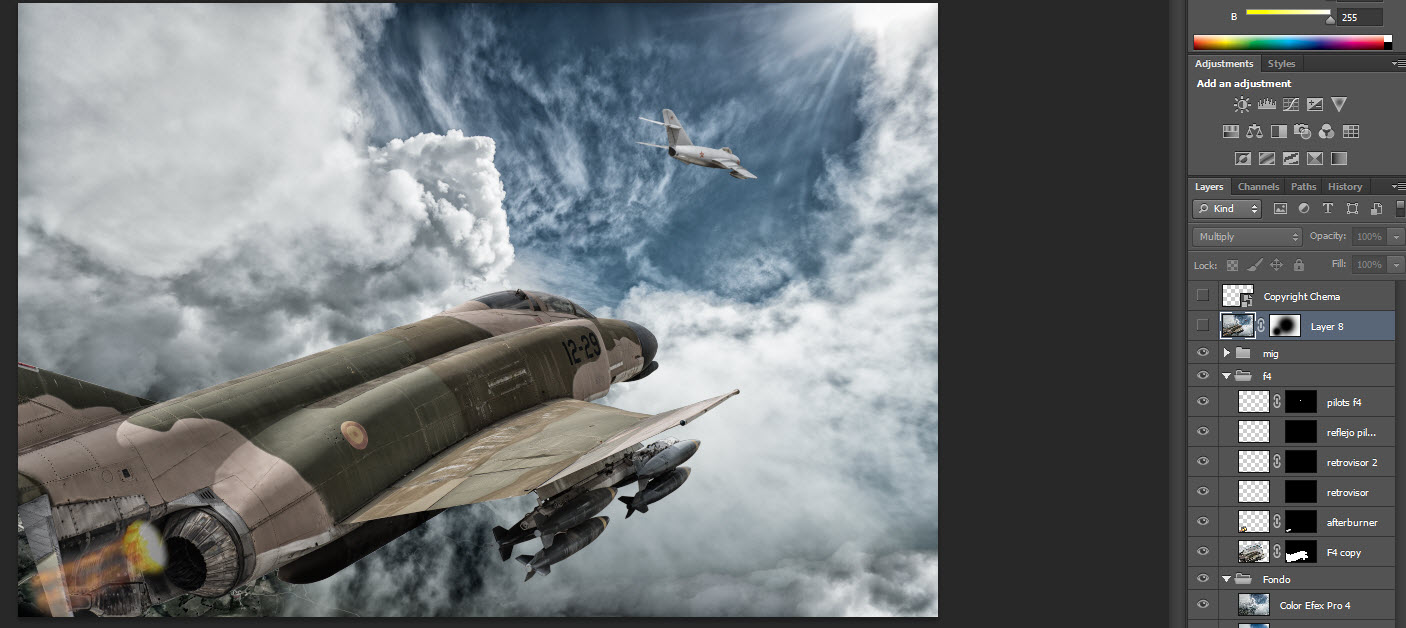
I created a layer mask to hide everything but the pilots and the seats.  Then I applied the layer mask to remove the unwanted parts.

 After that I placed them over the F4.

With the pen tool created a path of the F4 canopy.  Converted the path to selection and created a layer mask so the pilots seem to be behind the canopy.

Unlink the layer mask to the layer so you can move the pilot to adjust their position.

Change the blend mode to "soft light" and the pilots will look like they are inside the aircraft.


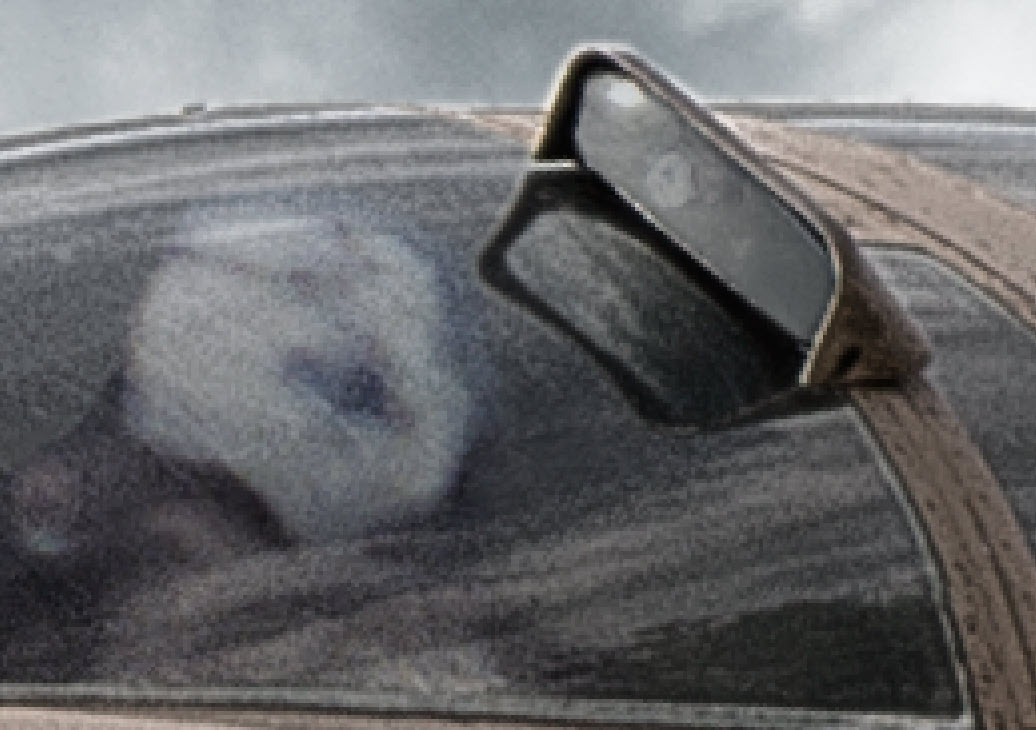
The rearview mirror and its reflection was also created with a portion of sky and the pilot's helmet that probably would be seen from viewer point of view.


This reflection is created following the same steps I used for the pilot and changing blend modes and transparency to find the most appropriated.

The MIG pilot has the same process.


Another detail is the F4 afterburner.

The F4 is on pursuit of the MIG so the engine should be at max power. I searched for an afterburner picture and adjusted its position to the F4 nozzle.


I had to clone some flames to make them larger. Place the  flames over the F4 and create a layer mask to hide the unwanted parts. In this case I did it by selecting the nozzle and applying a white mask. 

Sometimes, the selections make a sharp transition between the ubjet and the backgroud looking  pasted and unreal.

To get a more realistic look I refine the layer mask and feather it to approximately 5 px. This amount can change depending on the pictures.


I had to blur the MIG a little bit to take it out of focus. I used the Gaussian blur.

The focus of the image is on the F4 and a sharp MIG makes the scene look unreal with everything in focus.


 With everything set, I created a merged layer, Shift Ctrl Alt E, I am a PC user.


Changed the blend mode to Multiply and applied a white layer mask. it makes the image darker and increase contrast.


I painted with black over the F4 with a soft brush to make the F4 brighter and brig the attention to it.


An this is the final result.


I highly recommend the following books

Photoshop Compositing Secrets
 by 


Photoshop Down and Dirty Tricks for Designers
by Corey Barker


The Adobe Photoshop CS6 Book for Digital Photographers
by Scott Kelby


viernes, 24 de mayo de 2013

Hola a tod@s,

estos días he estado haciendo fotos en el museo del aire de Cuatro Vientos y tengo material para unas cuantas imágenes.

Los aviones militares dan para bastantes escenas impactantes. Además, los aviones antiguos siempre tienen un encanto especial.

Aquí os dejo algunas de las primeras creaciones que salen del ordenador.

Espero que os gusten.

Vigila tus seis !!


Douglas DC-3


F-104 Starfighter


lunes, 13 de mayo de 2013

Viento 360 20, autorizado a aterrizar

Hola a tod@s,

os dejo mi última composición de un CRJ 1000 aterrizando en Barajas.

Formada por tres imágenes. El fondo y el avión sacadas con la D800 y la tormenta de laderecha con la D700.

El avión está sacado con un 70-200 con TC-17 f11 1/500 ISO 100

El fondo con un 50mm a f1.4 1/100 ISO 6400

La tormenta con un 14-24 a f8 10 seg ISO 200

procesado en ACR y PSH CS6

Un saludo


viernes, 3 de mayo de 2013

buscando a KONG


Hola a tod@s,

he creado mi propia versión de esta famosa escena de la película King Kong.

He utilizado cuatro fotos. Una para los aviones, otra para el fondo, una para las nubes y la última para Kong.

Los aviones son cortesía de la FIO.

Un saludo